Model Overtime vs. Headcount Before You Commit

Model Overtime vs. Headcount Before You Commit

Peak demand is coming, overtime is rising, and you need to decide how to cover the workload.

Predien's labor and capacity layer watches the metrics you have configured and helps you decide whether to adjust overtime or add headcount. Your forward deployed analyst validates the signal and models the options at which site, at what point, and what each choice does to throughput before you set up the shift schedule.

Talk to an Analyst

How Does Predien Monitor Labour and Capacity?

Predien brings your labour and operating data together so you can see how changes in one part of the operation relate to others and understand what is happening across your business.

Continuous Monitoring

Predien watches configured labour and capacity metrics continuously, so changes in overtime, cost per unit, or volume do not have to wait for a reporting cycle.

Capacity Signals

See when changing demand or volume starts putting pressure on available labour and capacity at a specific site.

Analyst Validation

Your forward deployed analyst reviews the signal, confirms whether the change matters, and adds the operating context needed to understand what is happening.

Overtime vs. Headcount

Compare overtime and added headcount at the relevant site and volume level, including how each option could affect throughput before you commit.

What Every Labor Decision Puts in Front of You

Each analysis brings the key numbers, options, and operational impact together so your team can understand the trade-offs before changing the plan.

How the Forward Deployed Analyst Works with the Labour and Capacity Model

The platform handles monitoring and modeling. Next, the forward deployed analyst brings the operating context needed to turn those numbers into a decision your team can evaluate.

Validate the Change

The analyst reviews the signal to confirm whether the movement represents meaningful labor or capacity change.

Frame the Options

The analyst works with the relevant assumptions and puts the available choices in front of your team using your own business numbers.

Model the Trade-Offs

Overtime, additional headcount, site, volume, and other variables can be changed to see how each option affects the operation.

Keep the Model Current

As volume, staffing, costs, or operating conditions change, your analyst maintains the relevant model, so it continues to reflect on the operation you are running.

Model the Decision Before You Set the Schedule

Bring Predien the overtime or staffing decision your team is working through now. See the options modeled against your own labor and throughput numbers before you commit.

Talk to an Analyst

Questions Your Labour and Capacity Model Can Answer

Every model starts with the decision your team is actually trying to make.

Overtime or Headcount?

Should we absorb the additional workload through overtime or bring in temporary headcount?

Which Site Is Driving the Change?

Which facility is responsible for the increase in labor cost, and when did the movement begin?

What Happens if Overtime Changes?

What happens to throughput and cost per unit if we reduce overtime by 20%?

How Many People Do We Need?

What headcount level would give us enough capacity while keeping cost per unit at target?

Capacity Planning Before Labor Costs Rise

A change in volume can create pressure on labor and capacity before the impact is clear in financial reporting. Predien helps your team test staffing options against expected volume, labor hours, capacity, and cost per unit, so you can make changes before overtime becomes the default response.

Bring the decision you are weighing right now

See it tested on your own business numbers before you commit.

Who this is for

Predien is built for mid-market leaders whose, Business has outgrown their current analytical capabilities.

What happens next

Email one line with the decision you are weighing. It goes to the person who would run your Sprint, and they come back within one business day.

Test a Real DecisionWatch the Demo

Peak demand is coming, overtime is rising, and you need to decide how to cover the workload.

Predien's labor and capacity layer watches the metrics you have configured and helps you decide whether to adjust overtime or add headcount. Your forward deployed analyst validates the signal and models the options at which site, at what point, and what each choice does to throughput before you set up the shift schedule.

Talk to an Analyst

How Does Predien Monitor Labour and Capacity?

Predien brings your labour and operating data together so you can see how changes in one part of the operation relate to others and understand what is happening across your business.

Continuous Monitoring

Predien watches configured labour and capacity metrics continuously, so changes in overtime, cost per unit, or volume do not have to wait for a reporting cycle.

Capacity Signals

See when changing demand or volume starts putting pressure on available labour and capacity at a specific site.

Analyst Validation

Your forward deployed analyst reviews the signal, confirms whether the change matters, and adds the operating context needed to understand what is happening.

Overtime vs. Headcount

Compare overtime and added headcount at the relevant site and volume level, including how each option could affect throughput before you commit.

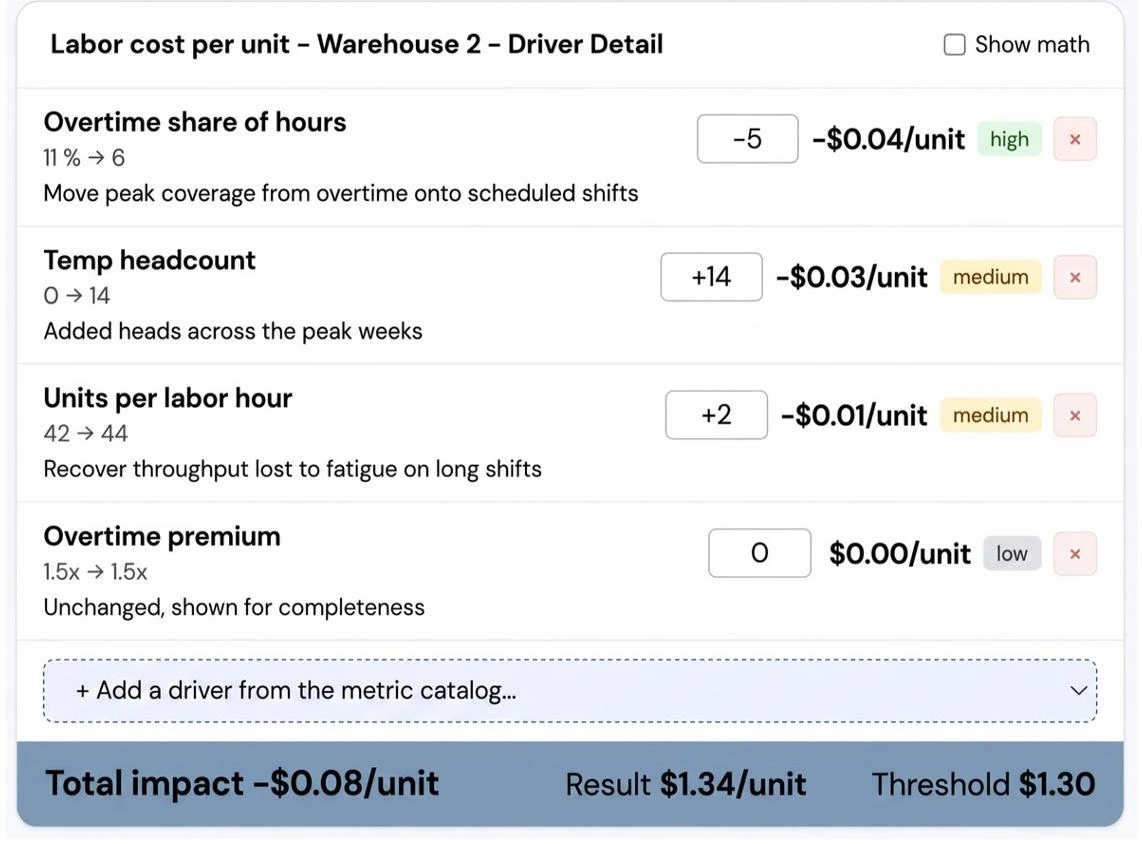
What Every Labor Decision Puts in Front of You

Each analysis brings the key numbers, options, and operational impact together so your team can understand the trade-offs before changing the plan.

Cost Comparison

See how overtime and added headcount compare based on your actual labor costs, volume, and operating assumptions.

Staffing Options

See the staffing choices being considered, including how much additional headcount may be needed and where.

Site-Level Impact

Understand which site is driving the change and how the decision affects that location.

Throughput Impact

See how each option could affect the amount of work the operation can process.

Processing Time

Understand how a change in labor or capacity could affect order processing time.

Decision Point

See the volume, overtime level, or staffing point at which one option may become more suitable than another.

Analyst Context

Your forward deployed analyst explains the important changes, adds operating context, and helps your team understand what the numbers mean for the decision.
How the Forward Deployed Analyst Works with the Labour and Capacity Model

The platform handles monitoring and modeling. Next, the forward deployed analyst brings the operating context needed to turn those numbers into a decision your team can evaluate.

Validate the Change

The analyst reviews the signal to confirm whether the movement represents meaningful labor or capacity change.

Frame the Options

The analyst works with the relevant assumptions and puts the available choices in front of your team using your own business numbers.

Model the Trade-Offs

Overtime, additional headcount, site, volume, and other variables can be changed to see how each option affects the operation.

Keep the Model Current

As volume, staffing, costs, or operating conditions change, your analyst maintains the relevant model, so it continues to reflect on the operation you are running.

Model the Decision Before You Set the Schedule

Bring Predien the overtime or staffing decision your team is working through now. See the options modeled against your own labor and throughput numbers before you commit.

Talk to an Analyst

Questions Your Labour and Capacity Model Can Answer

Every model starts with the decision your team is actually trying to make.

Overtime or Headcount?

Should we absorb the additional workload through overtime or bring in temporary headcount?

Which Site Is Driving the Change?

Which facility is responsible for the increase in labor cost, and when did the movement begin?

What Happens if Overtime Changes?

What happens to throughput and cost per unit if we reduce overtime by 20%?

How Many People Do We Need?

What headcount level would give us enough capacity while keeping cost per unit at target?

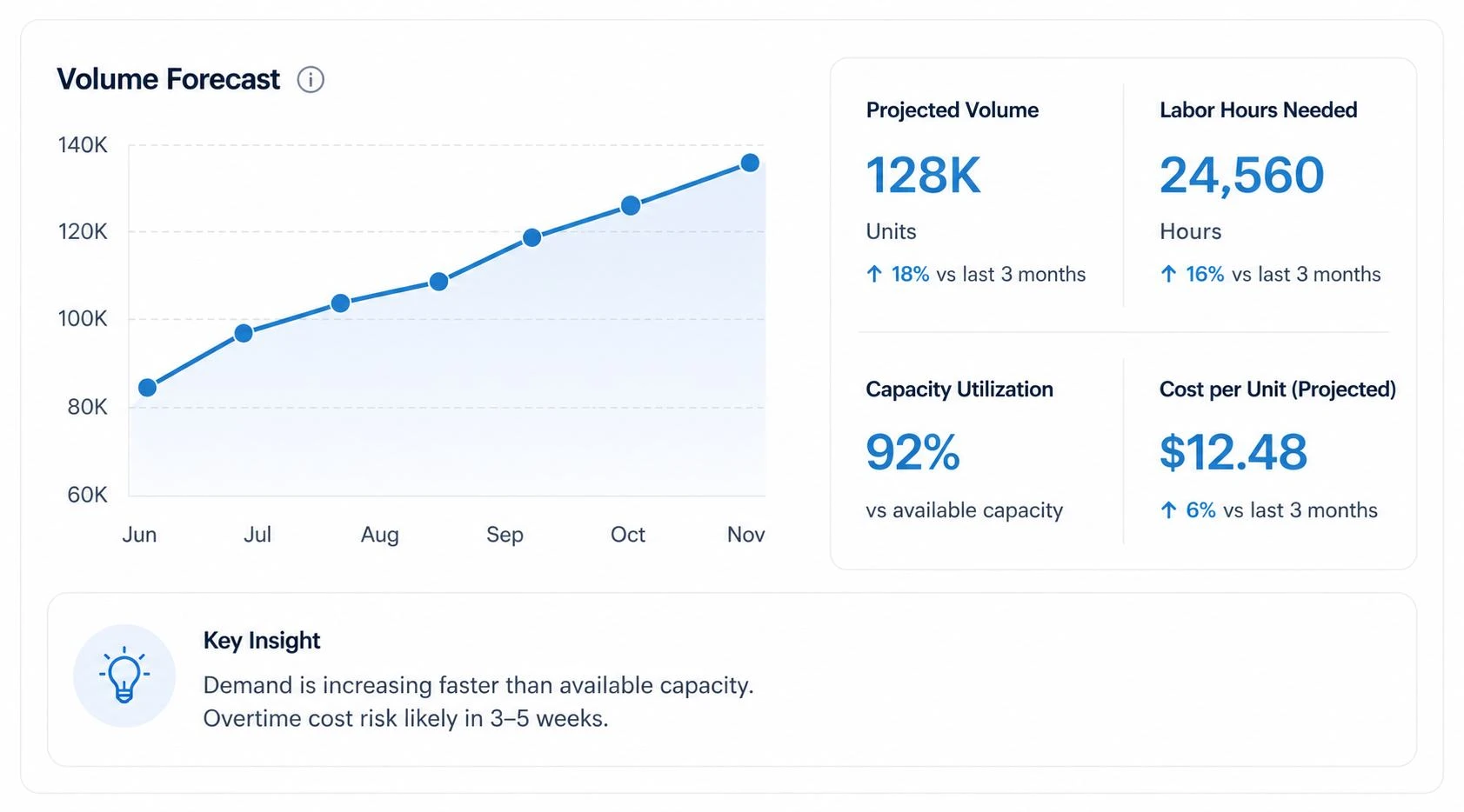
Capacity Planning Before Labor Costs Rise

A change in volume can create pressure on labor and capacity before the impact is clear in financial reporting. Predien helps your team test staffing options against expected volume, labor hours, capacity, and cost per unit, so you can make changes before overtime becomes the default response.
Bring the decision you are weighing right now

See it tested on your own business numbers before you commit.

Test a Real DecisionWatch the Demo

Who this is for

Predien is built for mid-market leaders whose, Business has outgrown their current analytical capabilities.

What happens next

Email one line with the decision you are weighing. It goes to the person who would run your Sprint, and they come back within one business day.